Over the last decade, the gaming landscape has transformed dramatically, with cross-platform play evolving from a distant dream to a standard feature. For the *Call of Duty* community, this has been a unifying force, yet it comes with its own set of challenges. If you're looking to disable crossplay in *Black Ops 6*, here’s a comprehensive guide to help you decide and act.
Should You Disable Crossplay in Black Ops 6? Answered
Opting to disable crossplay in *Black Ops 6* presents a nuanced decision. The primary motivation for many players, particularly those on Xbox and PlayStation, is to ensure a more level playing field. Console gamers often seek to avoid competing against PC players due to the distinct advantages PC users have, such as the precision of mouse and keyboard controls. These can provide a significant edge in aiming compared to using a controller. Additionally, PC players might have easier access to mods and cheats, despite *Call of Duty*’s robust Ricochet Anti-Cheat system. Reports from *Black Ops 6* and *Warzone* players suggest a persistent issue with hackers and cheaters, which could be mitigated by disabling crossplay.
However, there's a significant caveat to consider: disabling crossplay shrinks the pool of potential opponents. This can lead to longer wait times for matches and potentially weaker connections between players. In our testing, disabling crossplay noticeably extended the time needed to find a match and occasionally resulted in poorer in-game connectivity.
**Related: Full Call of Duty: Black Ops 6 Zombies Walkthrough**
How To Turn Off Crossplay in Black Ops 6
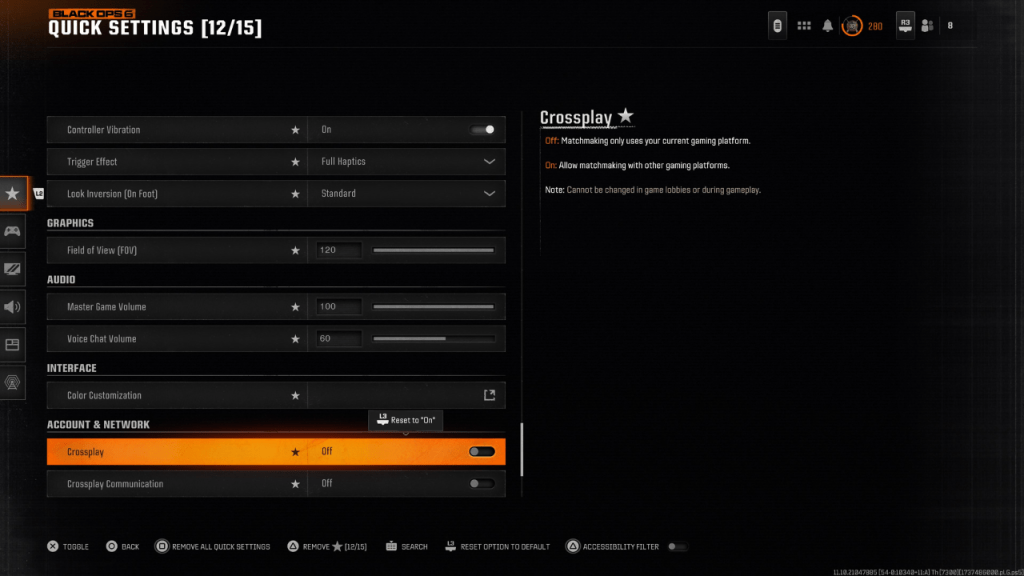 Disabling crossplay in *Black Ops 6* is straightforward. Navigate to the Account & Network settings, where you'll find the Crossplay and Crossplay Communications toggle at the top. Simply scroll to these options and press X or A to switch the setting from On to Off. This can be done directly in *Black Ops 6*, *Warzone*, or from the main *Call of Duty* HQ page. Note that in the image above, the Crossplay setting was accessed by favoriting it and adding it to Quick Settings for easier access.
Be aware that at times, the setting may appear greyed out and locked, especially in certain modes like Ranked Play, where crossplay has historically been mandatory. This was intended to promote fairness, but often resulted in the opposite. Fortunately, starting from Season 2 of *Black Ops 6*, players will have the option to disable crossplay even in these high-stakes modes, giving you more control over your gaming experience.
*Call of Duty: Black Ops 6 is available now on PlayStation, Xbox, and PC.*